Collector
A watch on the edge of your network. It spots scanners and floods — and can ask your router to block them.
View on GitHubSee Collector in action
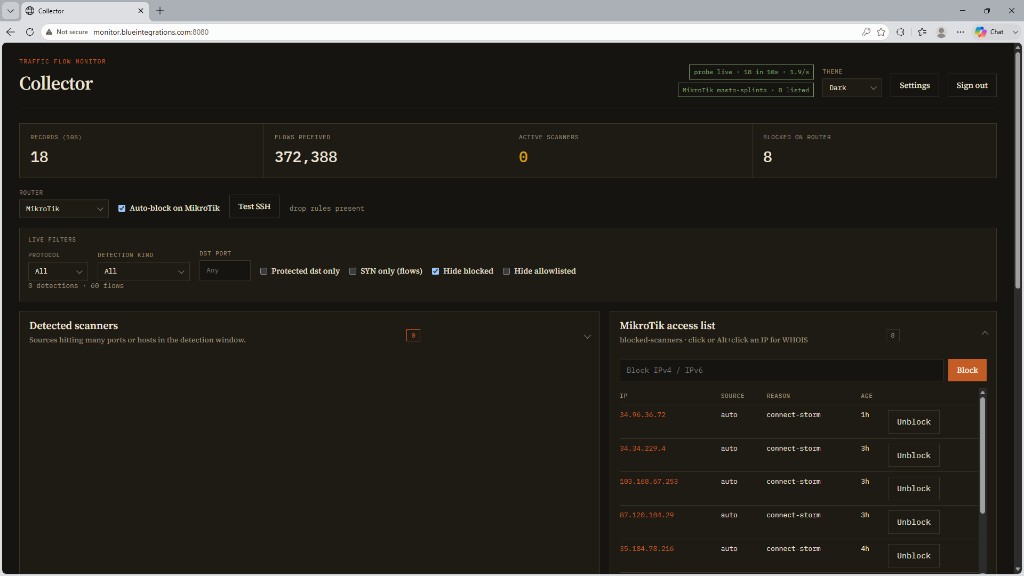
The live dashboard: traffic summaries, scanner detections, and optional MikroTik blocks — all on one screen.
What it does
Collector listens to traffic summaries from your router. It does not sit in the path of customer traffic. When someone starts knocking on a lot of doors — a port scan, a sweep, a flood — you see it in a simple dashboard.
By default it only reports. Blocking stays off until you turn it on. Your own office, management, and public DNS addresses stay off the block list.
See what’s knocking
A live view of recent traffic, who looks suspicious, and who you have already blocked.
Catch the usual attacks
Port scans on one host, sweeps across many, noisy floods, and oversized bursts — without a wall of charts.
Talks to your router
Works with MikroTik, Cisco, and Juniper. You pick the brand; Collector can add or remove a block when you want it to.
You stay in control
Watch first. Turn on auto-block later. Trusted networks are never blocked by accident.
Ping the team
Optional Slack or Discord notes when something is found or blocked — without flooding the channel.
Tune from the screen
Change how sensitive it is, manage alerts, and update the software from the same portal.
Who it’s for
Small ISPs, labs, and anyone running a MikroTik, Cisco, or Juniper box at the edge who wants a clearer picture of scan noise — without buying a carrier-grade platform.
How it fits
Your router already knows who talked to whom. Collector reads that story, flags the rude guests, and can tell the router to shut the door. Everyday traffic keeps flowing as it always did.
Open source
Collector is free to use and inspect. The install notes and source live on GitHub.
Want help standing it up, or pairing it with other ops tools? Send a note.